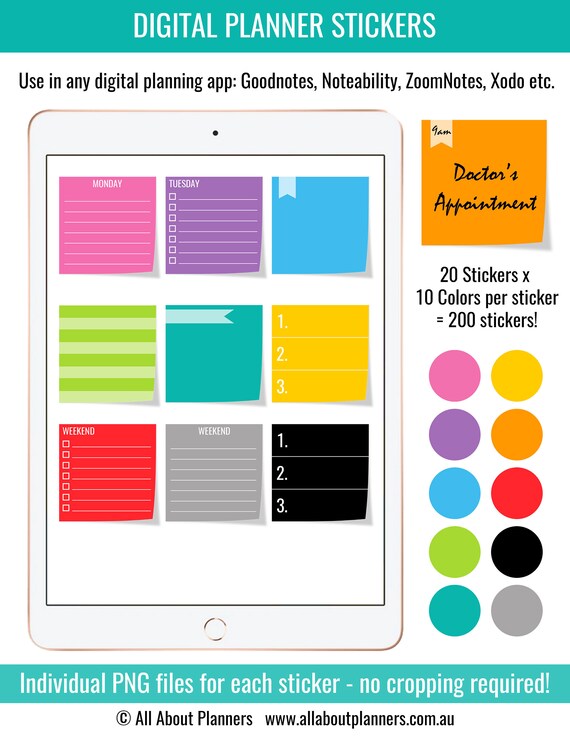
Digital sticky note page flag Planner Stickers days of the week organizing to do color coding rainbow individual PNG transparent background

Product Info
Plan your week using sticky notes!
_____________________________________
INCLUDED STICKY NOTES
I've included sticky notes for each day of the week and one for weekend if you don't want to split tasks between Saturday and Sunday.
Each day (and the weekend) has both lined and checklist versions.
There's also 4 sticky notes you can use for anything, anywhere in your planner.
There are 10 colors (refer photo 2), with 20 different sticky notes for each color.
_____________________________________
USING THE STICKERS
The bottom 4 sticky notes are great for:
- Bullet journaling
- Adding some color to your spreads
- Meal planning
- Blog post planning
- Creating a to do list bank (weekly or monthly) - one sticky note per task (keep these organized on one page of your planner and then copy them to the daily / weekly / monthly spread as needed)
- One sticky note for each task of a project
- Color coding
- Most important task or top 3 for each day
- For creating a weekly overview
_____________________________________
Sticky notes can be resized up or down.
These stickers are not intended for printing. They are not sized to suit a specific planner. If you are looking for printable planner stickers I have more than 400 sheets in my shop! https://etsy.me/36gQUWF
Once purchased you can use the stickers as many times as you like for personal use only.
The watermarks will not appear on your copy.
_______________________________________
USING THESE STICKERS
Each individual PNG (and each sticker on the full sticker sheet pages) are high quality crisp images.
Use 1 color, mix and match 2 or 3 colors or use all colors. Minimalist black and grey are included too.
Use in Goodnotes, Noteability, Noteshelf, Nebo, Xodo, ZoomNotes etc.
_______________________________________
Files will be available for INSTANT DOWNLOAD after payment has been received. Please check your emails for a link to the download page.
_______________________________________
FILE FORMAT
- 200 individual PNG files in a zipped folder (I use iZip for iPad to unzip the files) - ready to use in your planner, no cropping required. Unzip the file folder and save to the camera roll of your device, and insert into your digital planner via the add image button
- 12 PNG files (1 color per PNG file with all of the labels on the one sheet). If you don't want to use the individual PNG files, you can crop the stickers from this sheet
_______________________________________
More digital planner stickers in my shop: https://etsy.me/2R0KFkA
Printable planner stickers: http://etsy.me/1IXehRm
Digital Planning tips & tutorials on my blog: https://allaboutplanners.com.au/category/digital-planning/
______________________________________
PLEASE READ
Please ensure your iPad can open zipped folders. I use iZip for iPad to unzip the files.
The watermarks will NOT appear on your copy.
Please note that this is a digital product and no physical product will be sent. After payment is received, you will receive an automatic email (to the email address you have listed with Etsy). In that email will be a link to the download page.
There are no refunds on digital items.
______________________________________
© All About Planners https://www.etsy.com/au/shop/AllAboutPlannersShop
Blog: http://allaboutplanners.com.au/
>>> Subscribe to the blog to access the free printables library!
http://bit.ly/2hdKzpd
YouTube Channel: https://www.youtube.com/channel/UCS-BDJTp4HVRbPoApDcl59w
Graphic Design Resources Shop: https://www.etsy.com/au/shop/PaperCravings
Online store: https://www.allaboutplannersshop.com.au/
______________________________
Copy and paste this URL into your internet browser to get started learning how to make your own planner stickers >>> https://app.convertkit.com/landing_pages/228743