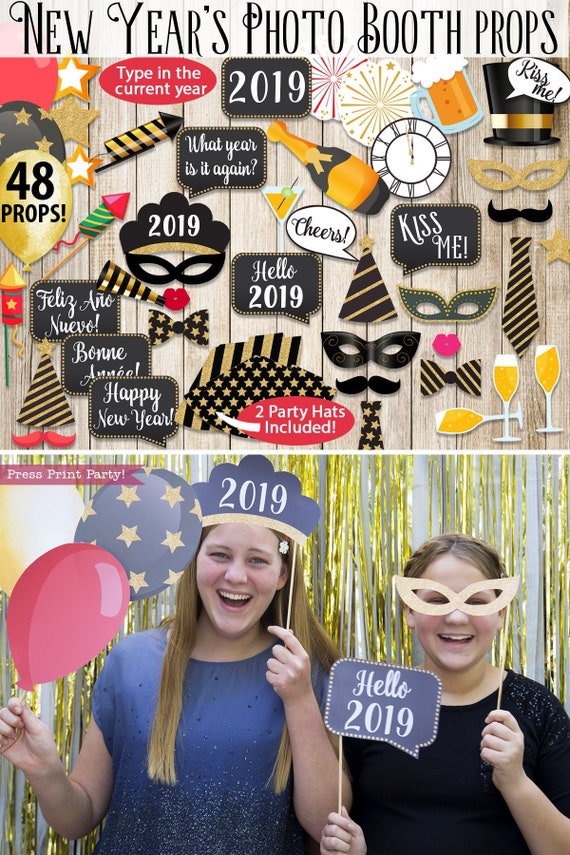
New Years Props Printable, Photo Booth Props, New Years Eve Decorations, Photography, Edit the year! Speech Bubbles, INSTANT DOWNLOAD

Product Info
Keep your guests occupied and happy by providing a photo booth at your New Year's party! These props come with everything you need for loads of New Year's fun!
• Instant Download
• Print, cut & tape a wooden BBQ stick to the back
• EDIT the year yourself! Use for ANY year!
• 48 Props in all!
• Includes 2 actual party hats
• Clear instructions included
• Print as many as you like for one low price!
INSTANT DOWNLOAD!! CUSTOMIZE NOW WITH THE LATEST FREE VERSION OF ADOBE ACROBAT READER!! PRINT AT HOME!!
---------------------------------------
FILE INCLUDES
---------------------------------------
► Clock at almost midnight
► 3 Champagne glasses
► 4 masks
► Champagne bottle
► Martini Glass
► 2 box ties
► 2 ties
► "Happy New Year" speech bubble
► "Feliz Año Nuevo" speech bubble
► "Bonne Année" speech Bubble
► 2 "Kiss me" bubbles
► "What year is it again?" speech bubble
►"Hello YEAR" speech bubble with EDITABLE YEAR
► YEAR sign with EDITABLE YEAR
► "Cheers" speech bubble
► 3 Fireworks rockets
► Noise maker
► 2 party hats props
► 2 actually party hats
► Tiara with EDITABLE YEAR
► 3 mustaches
► 2 lips
► 4 stars
► 3 balloons
► Beer glass
► 3 Fireworks
---------------------------------------
HOW IT WORKS
---------------------------------------
Just so we’re clear. You won’t receive any physical product in the mail.
1. INSTANTLY DOWNLOAD YOUR FILES
The file is available for immediate download after payment. Just follow the link to your Etsy download page:
https://www.etsy.com/your/orders/YOURORDERNUMBER/downloads
(or find the download button on your Etsy Purchases page).
2. OPEN YOUR FILES IN ADOBE READER
It's very important to open printable files with customizable fields with LATEST Adobe Reader only! Other pdf viewers (like Mac Preview) will not show the fields correctly resulting in text that’s not centered.
Adobe Reader is available for FREE on the Adobe website: http://get.adobe.com/reader/
3. PERSONALIZE YOUR FILES
With your file open in Adobe Reader, just type over the sample text. Save any changes you make. You CANNOT change graphics or fonts. All text is editable unless otherwise stated at the top of the listing. Please contact me if you need more fields than provided.
4. CHOOSE YOUR PAPER
All of the printables in my shop (unless specifically stated) are meant to be printed on 8 1/2" x 11" or A4 white cardstock (80lb-110lb). You can find white cardstock at any office or big box store (like Walmart).
5. PRINT YOUR FILES
These printables are meant to be printed at home. Any color inkjet printer will give very nice results. Print as many as you’d like.
If you'd like, you may take your file to an office store and use their computers and printers.
You may also save the pages you need at home and send only the pages you need to an office store. Most of my files are multi-pages, so if you need all the pages sent to you separately, just message me on Etsy. I'm here to help.
Make sure the print shop is using the latest Adobe Reader to open the files. Any other programs will mess up the fields.
*Unfortunately I DO NOT offer a print and ship service and only supply the digital files.
Check out the instruction video for more: https://youtu.be/EIcPzzYLnfY
6. CUT YOUR DESIGNS
Trim/cut out using scissors, craft knife, paper trimmer or punch. Some designs may need assembling. All my printables come with detailed instructions.
---------------------------------------
FAQs
---------------------------------------
For any more questions, please check out the FAQ section down below. I’m also always here to help.