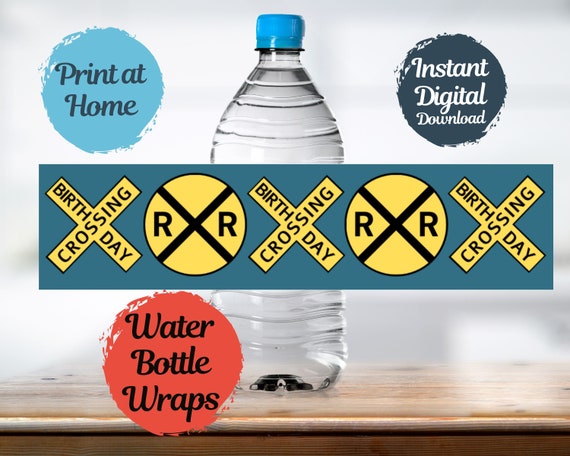
Railroad Crossing Water Bottle Wraps, Train Birthday Decoration, Water Bottle Labels, Print Home Train Party Decor, Train Food Labels TRA123

Product Info
We love these railroad crossing water bottle labels and so will your engineer guests! These labels are a quick and easy way to add more "Train" to your party! When printing at home, we suggest selecting "Fill Page" for the printer settings in order for the label to stretch to each side of the paper. We used regular printer paper for the example in the main photos so you can see what that looks like, but we recommend using cardstock or thicker paper for these labels.
Matching Napkin Wrap Rings:
https://www.etsy.com/listing/1435243415/railroad-napkin-wraps-digital-download?click_key=628c31ed78d3ff0b65a2deaef2d5527352bc5076%3A1435243415&click_sum=b00dfb29&ref=shop_home_active_1&sts=1
Matching Cupcake Wraps:
https://www.etsy.com/listing/1422476394/railroad-crossing-cupcake-wraps-train?click_key=60c0b24db5ea0bd8b6ed1edf9943b4b4ad0bda42%3A1422476394&click_sum=312d193e&ref=shop_home_active_1&sts=1
Matching Cupcake Toppers:
https://www.etsy.com/listing/1437026115/railroad-crossing-cupcake-toppers-train?click_key=d7d6c79cade91fdc7e16fbc7f42bbadd5f0483ce%3A1437026115&click_sum=691b3ff2&ref=shop_home_active_1&sts=1
Directions for application to bottle:
Cut out all 4 labels.
Cut off white paper section at back of label.
Wrap Label around water bottle.
Apply small amount of glue (glue stick recommended) or tape to the back end corners of the label and press.
NOTE: This is an EDITABLE DOWNLOAD. You will need to register for the FREE version of Canva to edit this download. (No need to sign up for the Pro/Paid Canva Version.)
Label Size:
8" x 2"
How it works:
1. Purchase your Digital Invitation Template from our Etsy shop.
2. Go into your Etsy Profile under "Purchases and Reviews" (and make sure to give our invites a 5 start review!).
3. Click on the link to your digital download
4. Register for your FREE version of Canva
5. Open Digital Label File
6. Follow Printing Instructions below
7. After printing, cut out each label and tape or glue to water bottle
PRINTING INSTRUCTIONS:
Once your Invitation is edited as you would like you (be sure to double check!)
click:
1. Share (upper right hand corner)
2. Download
3. Select File Type based on your need (PDF Print for best printing quality)
4. Download
5. Send invitations to your favorite print shop or print right from home!
****Please contact me if you have any questions along the way. I'm always happy to help!****
*** This is a digital file so no returns or exchanges accepted.***