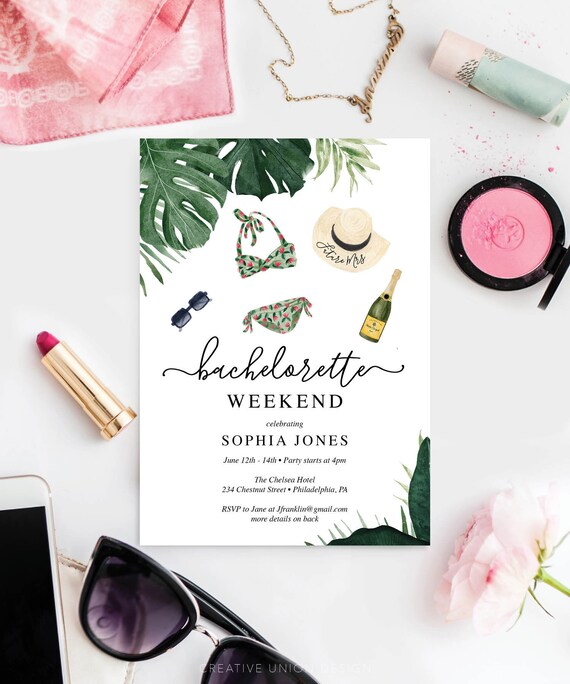
Printable Bachelorette Party Invitations - Beach Bachelorette Weekend Invites - Bachelorette Itinerary Invite - Lake - Tropical Monstera

Product Info
Everyone will love this lovely (and editable) Bachelorette Party Invite!
Double sided to include the itinerary on the back!
With this purchase you will receive a high resolution editable pdf. Crop marks are provided for easy cutting. Easy to follow instructions included! Sample wording included to use as a guide!
• • • • • HOW IT WORKS • • • • •
In minutes you will have adorable invitations!
1. Download the PDF
2. Open the pdf in Adobe Reader (on your computer)
3. Save and print (double sided)
4. Cut out using crop marks
5. Place in an A7 envelope and send these lovely invites out!
**You will need Adobe Reader to edit these files. Don't worry - it's free!
https://get.adobe.com/reader/
• • • • • MATCHING ITEMS • • • • •
Build Your Own Bundle and save 60% when you purchase 5 or more items!
Go to our shop home page and search: Tropical Monstera
Or simply click here:
https://tidd.ly/32bqsN6
• • • • • FAQs & TROUBLE SHOOTING • • • • •
MY FILE IS NOT SAVING, WHAT CAN I DO?
All you have to do is update your Adobe Reader to fix most glitches with the file: https://get.adobe.com/reader/
• • • • • • • • • • • • • • • • • • • • • • • • • • • • • • • • • • • • • • • •
WHAT IS EDITABLE?
• The blue highlighted areas are editable
• Font size, color and style
• • • • • • • • • • • • • • • • • • • • • • • • • • • • • • • • • • • • • • • •
WHAT IS NOT EDITABLE?
• The background design
• Placement of text boxes
• The size of the file
• Main wording (see example in photos)
• • • • • • • • • • • • • • • • • • • • • • • • • • • • • • • • • • • • • • • •
HOW DO I PERSONALIZE MY INVITE?
Simply open your file in the latest version of Adobe Reader and type over the sample wording included in the file. Save & Print!
• • • • • • • • • • • • • • • • • • • • • • • • • • • • • • • • • • • • • • • •
HOW CAN I CHANGE THE FONT STYLE, SIZE OR COLOR?
It's very easy! Just select the line of text you want to change then hold down Ctrl+E (for Windows) or Command+E (for Mac) - that will bring up the properties bar. Included on the PDF is a free font suggestion, or use one of your current fonts! Free free to get creative!
• • • • • QUESTIONS? • • • • •
Feel free to send us a message, we usually respond within a few hours!
• • • • • TRY A FREE EDITABLE SAMPLE • • • • •
Click here to try a FREE editable PDF:
https://www.creativeuniondesign.com/blog/what-is-a-printable-how-to-edit-print-and-trim
• • • • • TRY AN EDITABLE SAMPLE • • • • •
Click here to download a FREE editable PDF so you can test out how Adobe Acrobat Reader DC works:
https://www.creativeuniondesign.com/blog/what-is-a-printable-how-to-edit-print-and-trim
• • • • • MORE IDEAS & INSPIRATION • • • • •
Blog: www.creativeuniondesign.com/
Instagram: @creativeuniondesign
Pinterest: pinterest.com/Creative_Union/
Facebook: search: Creative Union Design
YouTube: YouTube.com/CreativeUnionDesign
Zazzle: Zazzle.com/store/creativeuniondesign
*Recommend items may contain an affiliate link, meaning that we will receive a small commission if you decide to make a purchase through these links, at no cost to you.
Copyright © 2023 Creative Union Design, LLC. All Rights Reserved. All designs, wording and layouts from Creative Union Design© are not to be duplicated, shared, copied or used for commercial use. All designs, wording and layouts from Creative Union Design© are not to be duplicated, shared, copied or used for commercial use.