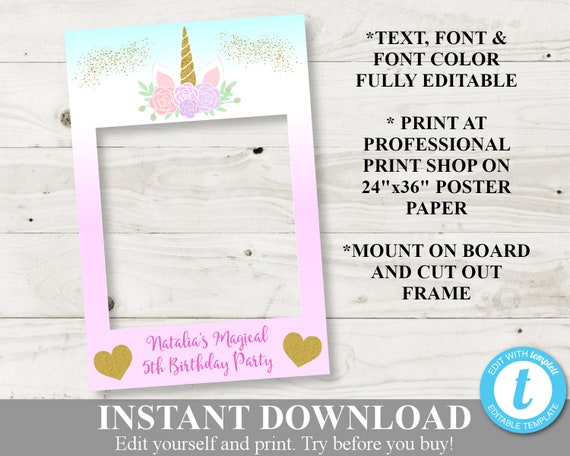
INSTANT DOWNLOAD Unicorn & Rainbows Printable 24x36 Photo Booth Birthday Party Frame / Digital File / Glitter Unicorn Collection /Item #3530
Product Info
♦ ♦ Edit right in your browser and download to print! ♦ ♦
The Printable 24"x36" Unicorn Photo Booth Frame is a cute and fun addition to your unicorn themed party. Edit your file using the Templett application, download and have printed at the professional printer of your choice. All text, font and font color is editable.
★ DEMO THIS TEMPLATE RIGHT NOW ★
------------------------------------
Check out this template (copy & paste link in browser):
Go to https://templett.com/design/demo/Divinepartydesigns/3350556
------------------------------------
YOU WILL RECEIVE:
♦ 24"x36" (300 DPI) Template
♦ Editing Instructions
--------------------------------
COMPLETE YOUR PARTY WITH THESE COORDINATING ITEMS:
♥ See all available UNICORN party items here:
https://www.etsy.com/shop/DivinePartyDesign?ref=seller-platform-mcnav&search_query=UNICORN
♥ BIRTHDAY PARTY INVITATION: https://www.etsy.com/listing/521543584/personalized-printable-5x7-unicorn?ref=shop_home_active_27
♥ PARTY PACKAGE: https://www.etsy.com/listing/650397218/instant-download-unicorn-printable?ref=shop_home_active_38&pro=1
♥ BIRTHDAY PARTY SIGN PACKAGE: https://www.etsy.com/listing/535908263/instant-download-unicorn-birthday-party?ref=shop_home_active_13
--------------------------------
DOWNLOADING/EDITING INSTRUCTIONS
1. Look for an email from Templett. The email from Templett will automatically be sent to the email address on file with Etsy. Please allow up to 15 minutes for payment to clear both Etsy and Templett. If you do not see the email in your inbox, check your spam/junk folder. Please feel free to contact me if you have not received the email within this timeframe.
2. Follow the link to access your file..
3. Make changes to the text, font, color, etc
4. After you have made your changes, click on “save” in the upper left hand corner”
5. When you are ready to print, click on “download” and select your file type.
6. If you are printing multiple items per page (i.e. Tags), select “PDF” file and turn on “save paper” and “show trim marks” options.
6. Print and trim your template (if necessary).
--------------------------------
PRINTING INSTRUCTIONS
♦ In Templett, type in the text of your choice. All text, font and font color can be changed.
♦ Click on download file in the top right corner. Select the file of your choice (PDF or JPG - Make sure you choose high resolution 300 DPI).
♦ PRINT: You will need to have the frame printed at a professional print shop as a 24"x36" Poster Print. Professional print shops include: Staples, Office Depot, FedEx/Kinkos, Vistaprint.com, posterprintfactory.com
♦ MOUNT: Mount yourself to foam board using adhesive spray or have it mounted at a local or online print shop.
♦ CUT: Once mounted, you will need to cut out the center using a utility knife.
***Please note that I can only control the design quality, not print quality. The colors as shown on your screen may print slightly differently depending on the printer/ink that are used. If you have printing issues, please contact us
--------------------------------
WHY TEMPLETT?
♦ You don't need any special software to edit!
♦ All text is fully editable.
♦ Use your template multiple times. Edit text and print as many times as desired.
--------------------------------
SHOP POLICIES
♦ Please review all shop policies before ordering. Because of the digital nature of our products, no refunds can be issued once the product(s) have been delivered.
♦ You can review all the shop policies here: https://www.etsy.com/shop/DivinePartyDesign?ref=seller-platform-mcnav&search_query=pink+lemonade#policies
--------------------------------
GET SOCIAL!!
Follow Divine Party Designs on Facebook and Instagram for discounts, free printables, giveaways and more:
♦ Facebook: https://www.facebook.com/divinepartydesigns
♦ Instagram: @divinepartydesigns
DIVINE PARTY DESIGNS © 2018
♥ Thank you and we look forward to working with you! ♥
[id:3350556]