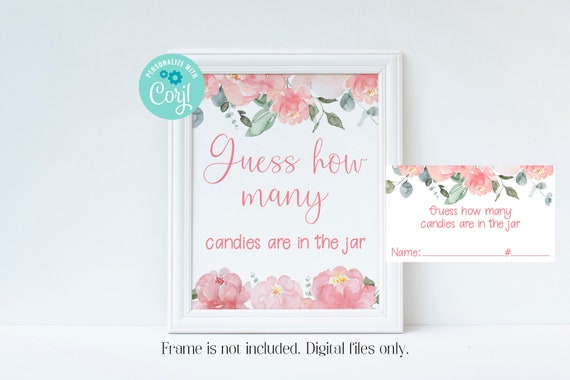
Editable Blush Pink Candy Guessing Game, Floral Baby Shower, Corjl, Instant Download, Baby Shower Games, Bridal Shower Games, PIBS, BBIB

Product Info
This listing is for an editable floral-themed Candy Guessing Game. The game is a fun icebreaker at your baby shower or bridal shower! Just place the cards next to a baby bottle, mason jar, etc, filled with candy, or modify the wording on the sign using Corjl to guess how many pacifiers, baby socks, garters, etc. Have your guests write down a guess on the included cards. At the end of the shower, the person closest to the actual number is the winner. Coordinating items can be found at these links: https://etsy.me/3saRPCS and https://etsy.me/3lGqyFY
*************
Nothing is physically shipped to you from this listing. You can easily most of the text on your computer, laptop, or mobile phone by using Corjl. You do not need to download any software to be able to use Corjl.
*************
TRY BEFORE YOU BUY:
To see how your sign and cards will look and to see how easy it is to edit, you can go to this link before purchasing: https://www.corjl.com/d/A00LN
*************
EDITING YOUR SIGN AND CARDS:
You will not be able to move the images or change the size of the sign or cards. You will not be able to modify the text on the sign that says "Guess how many" but you can edit the wording that says "candies in the jar. On the cards, you can modify all text except "Name" and "#" that are currently shown. Use this option if you are changing the item your guests will be guessing or if using a different item other than a jar.
*************
YOU WILL RECEIVE:
(1) 3.5x2" editable card template in JPG or PDF. Print 10 tags per 8.5x11 sheet. Once you edit one tag all other tags on the sheet will auto-fill with your information.
(1) 8x10 editable sign in JPG or PDF.
*************
USING CORJL:
After purchasing your item you will receive an email from Corjl with the link to edit your template. The email will be sent to the email address you have on file with Etsy. Make your edits and then save and download and print at home or your local copy shop. Be sure to set your printer to 100% or Actual Size before you print the invitation. Once you have downloaded and trim, cut on the trim lines. We recommend printing the cards on medium to heavy-weight white cardstock. Add the sign to an 8x10 frame. We recommend printing the sign on either cardstock or like you would an 8x10 glossy.
*************
MISC INFORMATION:
You will have access to your file for 180 days after that time you will need to purchase again.
Computer monitors can vary, therefore, what you see on the screen may vary slightly in color from what is printed.
artwork by VeryaStudio.etsy.com
Thanks for stopping by!